

Features · Groups · Admin
Track a group's attendance and activity
Beyond the roster, each group keeps a record of how often it meets and who shows up. The Overview and Attendance tabs turn that into an at-a-glance read on the group's health.
The Overview tab
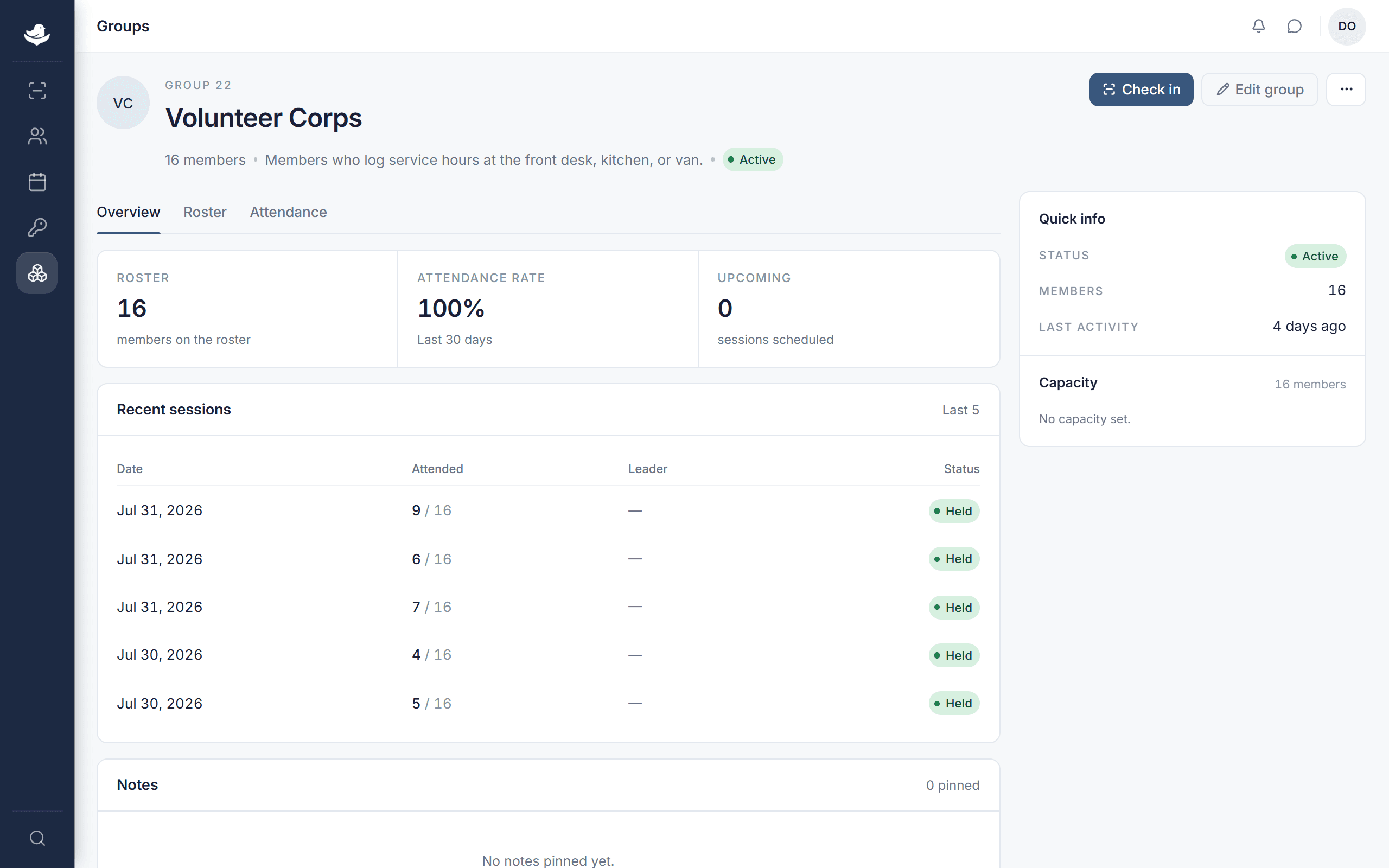
The Overview tab opens with three figures:
- Roster
- How many members are on the group.
- Attendance rate
- The share who attended over the Last 30 days, or Pending when there's nothing to measure yet.
- Upcoming
- How many sessions are scheduled ahead.
Under the stats, Recent sessions lists the group's latest meetings — date, how many attended (for example 5 / 20), the leader, and whether each was held, cancelled, or upcoming. Notes shows anything pinned to the group. Empty, they read No sessions on record. and No notes pinned yet.
The Attendance tab
The Attendance tab goes deeper. Last 12 months sums up the year — total attended, an average per month, and the peak — with a bar for each month. Below it, the Session log lists every session with its date, attendance, leader, and status. With nothing yet it reads No sessions logged.